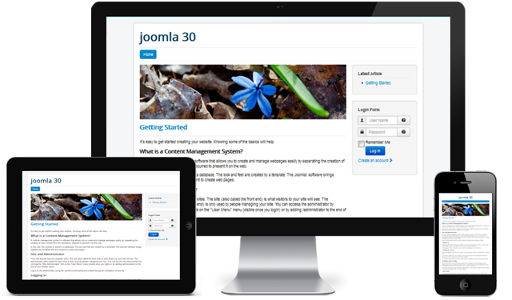
 In a previous post on Responsive Web Design (RWD), I outlined the use of Bootstrap in Joomla 3.x to implement RWD. In this post, we will take a more detailed look at Bootstrap, how it fits into the Joomla! CMS ecosystem, and how you can best take advantage of the new integration between the two.
So, to begin, we need to ask ourselves this fundamental question: What is Bootstrap? Simply stated, Bootstrap is an open-source HTML, CSS and (somewhat optionally) JavaScript UI framework created by Twitter (and incidentally, hosted on GitHub, in the same way that Joomla itself is). As the Twitter team explains in that initial introductory post, they created Bootstrap to provide internal web application developers a toolkit with which to build consistent interfaces. Bootstrap has since become one of the most popular Web UI frameworks in use today. What makes Bootstrap especially relevant for Joomla is that in v2, Bootstrap began supporting RWD.
Because of Joomla’s commitment to RWD, when it came to building Joomla 3.x, its developers looked for the path of least resistance; a UI framework that already worked well with Joomla and provided a way to make UI consistent across all of Joomla, while allowing the developers to customise it to fit Joomla’s specific needs. That framework is Bootstrap, and the decision was a no-brainer (this does not mean that Joomla’s developers aren’t already planning for the next great thing in UI).
One of the good things about using such a popular UI framework, with backing from an organisation like Twitter, is that Bootstrap is relatively well-documented and worked on by many people, who have shared their experiences online – not to mention Bootstrap’s own official documentation. Joomla, too, has a healthy and active user forum, so resources on getting Bootstrap and Joomla working together are readily available online (as my research indicates, simply searching for Joomla and Bootstrap together already gives you thousands of search results on Joomla’s official site alone).
Of course, some of those thousands of results are frustrated cries of help from people whose attempts to migrate their websites into using Joomla 3.x and Bootstrap have run into roadblocks. This is by no means a walk in the park, and has to be approached on a case-by-case basis. However, there are some very broad rules of thumb I can share, which can hopefully narrow down your options (although you should still investigate your own situation thoroughly).
The easiest migration path is for the person who started out by already using Joomla! 3.x (or who is migrating websites off another CMS/static design tool such as Dreamweaver). All you need to do is use a Joomla 3.x responsive template based on Bootstrap, ensure the rest of your extensions are Bootstrap-ready (and I take the opportunity to note that all of our extensions GCalendar, GCalendar Action Pack and DPCalendar have recently been refactored to take advantage of Bootstrap, so they’re RWD-capable), and you’re done!
What about the person who’s using an older version of Joomla with older extensions that have no (and will never have any) interactions with Bootstrap whatsoever? What should you do about making your current Joomla installation work with Bootstrap? Well, you should forget about it.
No, seriously. Just forget about it.
It would be far, far easier to create a new Joomla 3.x installation, start with a new responsive template, add responsive extensions that provide the desired existing functionality to your website (and in the process, perhaps look very hard at your existing web design) and port your site content across. You may even find that Joomla 3.x out-of-the-box can provide you all you need to deploy your site!
The true heart-breaking work is reserved for the poor Joomla website developer who’s using Joomla 2.x with Bootstrap, and (some of) whose templates and extensions also use Bootstrap. After all, it is so tempting to try and do an in-place upgrade – you’re already using Bootstrap, so how hard can it be? As it turns out, if you’re also using Joomla’s older MooTools framework (and chances are you have been), it’snotsoverysimple. This is where the case-by-case basis really applies, and you should consider whether the ‘nuke-n-pave’ solution as outlined above might not after all prove to be the less painful option.
Regardless of your decisions, Joomla 3.x has already deployed Bootstrap everywhere, and especially in its administrative backend UI, so this might be the right time for you to poke around and learn the Bootstrap ropes.
 When speaking of the top free and/or open-source Content Management Systems (CMSs), two names (amongst others) that inevitably come to mind are WordPress (WP) and Joomla. While most people would associate WP with blogging and Joomla with standard websites, both CMS platforms are based on PHP, capable of building any kind of site desired, have a thriving and large user base (WP has ~28% market share, while Joomla is used by some of the largest multinational conglomerates) as well as a large and thriving developer base (thousands of add-ons for both).
It’s come to the point when you can integrate WP and Joomla to serve up different sections of the same website – or seamlessly transfer from one CMS to the other. But even though both WP and Joomla are very similar in utility and functionality for end users, for add-on developers the two platforms could not be more different – and that difference is what this post seeks to establish.
WP has a fairly simple separation between the 2 kinds of add-ons it recognises; namely, Plugins for content, and Themes for presentation. There is a level of overlap between the two (Themes can include function.php that acts as a plugin and Plugins can influence how content is presented), but by and large, Plugins are Plugins, Themes are Themes, and are independent of each other.
In contrast, while individual Joomla extension types are clearly distinguished from each other (as explained below), a particular feature addition may have its functionality split up between various types of extensions, and extension packages give you the functionality of any number and types of related extensions in one easy-to-install unit.
Aside from WP’s Core system, Plugins do everything there is to do with content management and manipulation. WP defines them as tools to extend the functionality of WP. There is a subset of Plugins called Widgets (which are more or less equivalent to Joomla’s Modules) – but they are Plugins nonetheless. As such, a Plugin can be as simple as a file uploader or as complex as an entire file management or e-commerce system.
Joomla extensions, on the other hand, are clearly separated by function, purpose and scope. All Joomla extensions are one of a few defined types (component, module, plugin or template); there is no generic ‘extension’ that does not also fall into some subset.
In fact, WP plugins are exceedingly free-form. Want it class-based? No problem. Don’t care for classes? You can write a classic procedural Plugin instead. Want to set up MVC? Sure – in fact, there are already Plugins there that set it up for you. Don’t care for architectural patterns? Don’t need them. Want to write a Plugin that doesn’t use any WordPress APIs at all? Well… you could, although you might not like the overall experience much, and it’s highly discouraged.
You will have noticed at this stage that the difference is not so much in what Joomla extensions do vs. what WP plugins do, as it is the different approaches that WP and Joomla take towards the whole ‘content management’ issue. And it shows right where you’d expect it to, in the way you extend the core framework of both.
 We are thrilled to release DPCalendar 3.2 with some amazing new features. The main focus was to integrate additional external calendar sources into DPCalendar. More and more people have the need to show their personal or corporate events in Joomla. So we decided to integrate Microsoft Exchange services and any CalDAV server into DPCalendar. Beside that we made some performance improvements. We lowered the amount of Javascript and CSS files which are loaded in DPCalendar. The Joomla calendar has now out of the box support for structured data. What this means to you will be explained in detail in the following chapters.
Every Microsoft Exchange server has a SOAP API to access the calendar date. DPCalendar is able to integrate through this API your corporate events from any MS Exchange server. A successful pilot was completed for an Intranet of a well known specialized law firm in the Netherlands. Under guidance of Digital Peak and the customers external administrator Frank Westerhout from his own company ClassBase was the project finished within a couple of days. More customers already integrated their Exchange server into DPCalendar already. Why not you?
CalDAV is a worldwide internet standard to access scheduling information of calendar systems like iCloud or ownCloud. It is based on the WebDAV specification and allows external client applications like Thunderbird, iCal or any iOS or android smartphone and tablet to access the events of CalDAV servers. Now the list of clients can be extended with DPCalendar! But the integration is not read only, if you have the sufficient permissions you can update the CalDAV events directly from DPCalendar with it's Ajax based interface. No need to swap the systems. We come out of the box with two way CalDAV sync.
All major search engines like Google, Bing, Yahoo or Yandex support structured data in their search results. More information can be found at schema.org. What does it mean for your SEO? For example if you are a band who wants tho show your next gigs directly in search engines results, you have to enable the DPCalendar upcoming module on your landing page, that's it! No complex configuration. Check the image below how our demo site looks like on Google search.
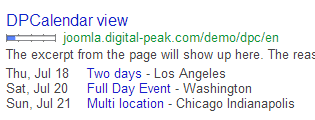
Here is a list of other changes which should simplify your life of managing events with DPCalendar:
Many more performance improvements and bugs are fixed as well.
In the next major release of DPCalendar we will introduce attending events where your users will be able to register on the premier Joomla calendar events. The long outstanding function "Reminder notification" will be implemented in this release as well. Follow us on Twitter to stay up to date with the progress.
 Digital Peak had all of it's Joomla extension code in Subversion repositories, as it was state of the art a couple of years ago. Nowadays Git is widly used under PHP developers and also Joomla itself stores it's code on Github. It was time for us to move to Git. Now we store our public code on Github and the private code on Bitbucket. As I'm a total newbie with Git, probably some steps can be made simpler but the migration explained below worked for us and I hope it will be of help for others too.
If you are not interested in the code histroy then just create a new Git repository and copy the most actual code, probably th SVN trunk to it. But we were interested in the full commit history so here are the steps to migrate your Subversion repository to to Git on an Ubuntu machine.
Install the needed packages from the Ubuntu:
$ sudo apt-get install git-core git-svn
$ sudo apt-get install subversion.
$ mkdir git
$ cd git/
Subversion has a simple authoring system on the otherside Git uses the convention Name <email>. To convert the authors from Subversion to Git format perform the following steps:
$ svn log -q https://mysvnrepo.com/reponame | awk -F '|' '/^r/ {sub("^ ", "", $2); sub(" $", "", $2); print $2" = "$2" <"$2">"}' | sort -u > authors.txt
Then you have manually to adapt the file authors.txt to the new usernames. For example
laoneo = laoneo <laoneo>
becomes
laoneo = Lao Neo <laoneo@digital-peak.com>
This is the step where your SVN repository gets converted to the Git repository:
$ git svn clone https://mysvnrepo.com/reponame/ --no-metadata -A authors.txt --stdlayout
Depending on your repository size it can take a while, but you should see on the screen step by step how each commit gets converted.
We create a new bare repository where the migrated repository gets merged into.
$ git init --bare new-repo
$ cd new-repo/
$ git symbolic-ref HEAD refs/heads/trunk
Push orig to the new one.
$ cd ../dpcalendar
$ git remote add bare ../new-repo/
$ git config remote.bare.push 'refs/remotes/*:refs/heads/*'
$ git push bare
Now we have to do some cleanup before we can push it to one of the online repositories. First we have to rename trunk to master.
$ cd ../new-repo/
$ git branch -m trunk master
The git svn command creates from the tags branches, means we have to create from them git tags and then delete the branches.
$ git for-each-ref --format='%(refname)' refs/heads/tags |
cut -d / -f 4 |
while read ref
do
 git tag "$ref" "refs/heads/tags/$ref";
 git branch -D "tags/$ref";
done
If you need to cleanup some invalid tags then do it now.
$ git tag -d Archive
If there doesn't need to be done more work on code we can push it to the online repository (if you want you can do ssh key exchange before).
$ git remote add origin https://github.com/Digital-Peak/GCalendar.git
$ git push --all
$ git push --tags
Now we are done!!
 The second Joomla World Conference is due to take place in November this year and will be held at Harvard University in Boston on 8-10 of the month.
This year’s focus will be on networking, knowledge, sharing and community and is the biggest Joomla event in the world. The conference is tailored towards the Joomla community and the “spirit of open source technologies”.
This will include the attendance of vendors and event sponsors and will be available over two levels of the venue space. Attendees will get the chance to chat with their favourite vendors and it’s thought that many of the vendors will have special offers and some free offers. Vendors and sponsors will also be available for questions and consultations too.
At the second Joomla World Conference, the organisers are reaching to educational faculties in order to encourage students and local universities to get to know the CMS software. Anyone in the local area that is interested, be it a teacher or student, should get in touch with the organisers for further details, or visit the conference website.
This is an ideal opportunity for students who are interested in becoming a developer and want to learn how to use Joomla.
According to event website, the ‘sharing’ aspect of the event is designed for those devs who have formed a relationship over Skype chats, forums or mailing lists to meet each other in person.
At a recent Joomla event, one of the organisers overheard a conversation which likened events of this kind to a “family reunion”. This underlines the fact that Joomla is a strong community and a relatively close knit group, but one that opens newcomers with welcome arms.
Anyone can speak at the conference and calls for speakers began last week. Prospective speakers should consider if the subject they want to talk about is appropriate, thinking beyond the obvious. The event is looking for innovative speakers who can really inform, educate and engage with the Joomla developer audience.
Tickets for the event are already on sale on the conference website at the special early bird price of $249 for 3-day entry.
