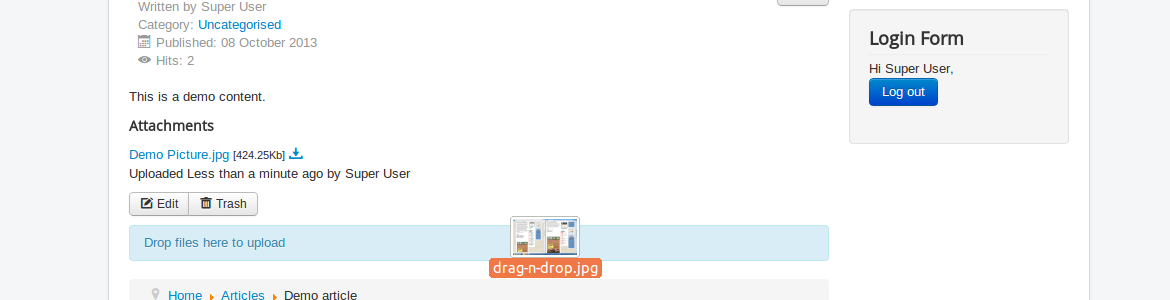
We have been on a roll these past few weeks! First was our DPSlider extension, and our case management tool (which, incidentally, is why we may not have been as quick to respond to support issues as we have been), and now I would like to introduce to you our latest free extension: DPAttachments. DPAttachments is a simple but very powerful attachment extension suite, which seamlessly integrates file attachments into articles (or any other component which triggers the onContentAfterDisplay event).
DPAttachments integrates automatically with the following extensions:
Content Articles
DPCases
DPCalendar Events
And many more ....
Just drag and drop files into the article area, and the attachment will be generated automatically. If the file can be viewed in the browser, a preview mode is available, and download tracking comes out-of-the-box as standard.
There are plenty of use cases for this extension; I’m sure you will have your own, but here are a few (just to get your creative juices flowing):
Menus and business card attachments when food blogging
Flyers, brochures and coupons or vouchers when promoting a new product
Videos for HOWTO articles (as opposed to using YouTube to stream)
Screenshots for reporting support issues
If you have any other ideas, send them along to us!
On a technical note, DPAttachments attaches files to Joomla items like articles and inherits it's ACL settings. This means that you can use this extension without worrying who can manage attachments on a new place. The attachments are stored locally on your website, and the Joomla site administrator can remove them if space constraint issues crop up.
If you want to integrate DPAttachments into your own component, do read the developer guide at http://joomla.digital-peak.com – it only takes two lines of code, and you extension does support attachments.
DPAttachments is in its early stages and a preview release can be downloaded by our active DPCalendar subscribers from our download portal. After further testing and feedback from you, we will then make it available for free to the public. This is a big THANK YOU for your support all over the years for Digital Peak!!
We do plan to have additional features built into it, and be reassured that we will constantly (and vigorously!) be auditing our code to ensure the highest compatibility standard with the Joomla codebase, along with the new features. Please keep in mind that DPAttachments runs on Joomla 3.1 or higher only.
 It’s no surprise to anyone that Joomla has a commanding hold on the marketplace. It has a robust, multi-platform ecosystem of hosting companies, consultants, developers and other ancillary support resources for those who develop websites on Joomla. Since 2005, Joomla has gone forwards 3 major versions, added support for Responsive Web Design, spawned thousands of extensions and with the forthcoming native support of structured data, remains ahead of its time.
But Joomla started out as a fork of Mambo, a previously open-source (and now mostly-dead) Content Management System (CMS). A short read through of the history behind this fork can send chills down any developer’s spine. Could the same thing happen to Joomla, and if so, what happens then? The questions which arise do not have much to do with Joomla as a technical achievement, and everything to do with Joomla as a product supported by fallible human beings. So, let’s take a look at who’s behind Joomla, and whether you need to worry about its future.
In the real world, Joomla can be considered to be represented by two groups of people; its administrators, and its programmers. Joomla’s Leadership Team together is made up of both administrators and programmers, and they work closely together to ensure that the spirit of Joomla is carried out both in its daily operations, as well as in its project development.
The day-to-day administration of Joomla (and its assets) is handled by a non-profit organisation incorporated in the USA called Open Source Matters (OSM). Amongst other things, the volunteers in OSM largely handle the financial aspects (keeping Joomla well-funded and paying the bills), legal issues (sign contracts & other legal documentation, watch out for copyright/trademark infringements) and regulatory affairs (a matter of internal corporate governance). Oh, and they maintain Joomla’s various assets (such as the Internet domains). Most of the OSM Board also contribute to Joomla in other ways.
Joomla’s core programmers, on the other hand, concentrate on the software development and user experience aspects of the Joomla platform. These, too, are volunteers, and functionally separated into 2 groups; the Production Working Group (which handles code, language and documentation) and the Community Working Group (which handles the people populating the Joomla ecosystem and the communications between these various stakeholders with Joomla). Each working group has its own specialised teams specifically in charge of various key aspects of their responsibilities (e.g. Production has the Joomla Bug Squad, which identifies and fixes Joomla bugs, while Community has the Joomla User Groups Team, which supports the various Joomla User Groups).
When Joomla was initially set up, its key personnel came from Mambo, and their intention was to ensure that Joomla would not have to face the same issues that Mambo did. Hence, they spent a great deal of time crafting their mission and vision statements, as well as determine the necessary processes by which OSM remains accountable to what Joomla stands for, and true to its values.
But why only take them at their word? As the saying goes, trust… but verify. Hold them accountable for whatever they say, and make sure that they carry out their intentions in what they do. Open source does matter, and by keeping a close eye on them, you do your part in ensuring that Joomla will remain a premier open source CMS of choice for the foreseeable future to come.
 I thought I would take the opportunity to announce (and introduce you to) DPSlider, our newest free extension for the Joomla! CMS. DPSlider is a content slider module that provides you with a responsive, touch-enabled page section through which multiple (up to 10) ‘sub-pages’, or slides, of content can be displayed in a slideshow fashion. Each separate slide can be swiped/dragged left or right to display the next slide (we have enabled wraparound so the last slide will wrap to the first and vice versa), or you can click on any individual slide on the position indicator to directly display the contents on that slide.
You can use DPSlider for various purposes; as we have used it on our DPCalendar product page for explaining its (DPCalendar’s, that is) individual benefits, in a photo gallery to ‘flip’ through different pictures, or as a drop-in streamlined (yet still surprisingly powerful) replacement for SlideShare or other presentation slide deck viewers. Or think up your own use; you’re limited only by your imagination.
DPSlider is still in its early days yet, so documentation is somewhat sparse on our site, and of course, there are a number of features we plan to add over the course of its development. However, as it is now, it is 100% usable and will add some fun (and functionality) to any existing Joomla-powered website. So do keep a watch out for new cool things we might do later (e.g. more slide transition effects, higher number of slides supported, autoplay option, 3D, that sort of thing), but in the meantime, this is a lightweight alternative to the other slider extensions you may have seen.
Here is our listing in the Joomla Extensions Directory, and have a look at our documentation on our own website. See how it works on our DPCalendar web page. You can get a copy of the source code from our code repository on Github and play around with it a bit, or even fork it and create some pull requests. I highly encourage you to try it out, and do let us know what you think about it. Who knows, the next revision might have your ideas in it!
This Joomla module is free of charge and can be downloaded withou registration and can be used without any limitation. That's a thank you to the Joomla community!
Mad props go out to iDangero.us, and especially their Swiper slider, which is where we, er, “swiped” and adapted some of the code (thanks, guys!).
 Since many years we have used a forum to interact with our customers. To handle the cases efficient, we at Digital peak decided that we need a more profesional solution. After testing out many solutions from trackers to project management tools we decided to create our own one. This was the birth of DPCases a professional case management tool where you can
We launched it today. At the same time we made the forum readonly and closed our ticket tool. We know it is a new direction we are heading to and it wont be without trouble at the beginning, but we are sure it will be the right choice. If you encounter any issue let us know by opening a case :-). Every case should be filled with as much information as possible and comments should be done carefully. Our target is to create a powerfull knowledge base for our customers.
We hope you are happy with our new too and excited as we arel!!
 Deciding to use the Joomla Content Management System (CMS) to host your website may have you wondering how much support or extensibility Joomla offers – yes, it’s the cat’s whiskers and the bee’s knees, but if you ran into problems, or wanted additional utility beyond what came in the box (so to speak), what are your options? This article quickly runs through and exposes the comprehensive nature of the global Joomla ecosystem, and the richness of your options when deploying it.
While it probably is best to run Joomla on LAMP (GNU/Linux OS, Apache Web server, MySQL DBMS, PHP) architectures, Joomla runs equally well on WAMP (W stands for Microsoft Windows), WIMP (I stands for Microsoft’s Internet Information Services Web server), and even on Apple’s OS X (with some help from MAMP/XAMPP or a lot of elbow grease)! You can also use BSD – the possibilities are literally endless. Just to prove the point, BitNami is a company that offers 1-click installers which will take you from a base-OS install to a fully-operational Joomla platform, whether on your own machines, or on virtual machines (VMs), or even in the cloud.
Just as you have a wide range of computing platforms that you can install Joomla on, you have a similar plethora of choices if you decide to outsource your Web hosting, no matter where in the world you are. Good Web hosting companies now support multiple OS platforms and scripting languages, and a large number of them will even feature auto-installing the CMS of your choice (Joomla amongst them). Some of the better hosts will additionally provide you with support on working with Joomla. So whether you are in Australia, New Zealand, Germany, the UK, USA, Canada, China, Malaysia, Kenya, South Africa, Panama or Argentina, there is a local Web hosting provider (and then some) ready to get yo rel="nofollow" target="_blank"ur Joomla-powered site up and keep it running smoothly.
Joomla is incredibly powerful and infinitely extensible – but that very flexibility can also lead to many people thinking that complex = complicated. For such people, there are innumerable consultants that deal with every aspect of deploying Joomla –whether it be in installing, securing, using, extending or designing Joomla and Joomla-powered websites, these consultants will get it done.
By far the most attractive part of Joomla lies in the power of its extensibility. Through the installation of various extensions both free and paid, you can get Joomla to do almost whatever you need. Do you need to use both WordPress and Joomla together? There’s an extension that runs WordPress within Joomla. How about connecting Joomla and Google’s services together? Extensions that do that include our own GCalendar and GCalendar Action Pack. Extensions exist to integrate cloud storage (such as SkyDrive, Dropbox, Box.net and others) into your website. You can make an all-singing, all-dancing Joomla-powered website by installing media-playing extensions. There are extensions providing email, forum, chat, even video conferencing functionality to your website.
Joomla has a rich user and developer base, with a large support structure. Take a good look around you – you’re sure to find exactly what you need.
