 Churches. Associations. Guilds. Clubs. Unions. Sports teams. Squads, companies, battalions and regiments. Mankind was designed to be social creatures from the beginning, and the varied number of ways in which we group together – and form bonds – proves the adage that “it is not good for Man to be alone”.
In the past, the primary means by which people kept in touch, renewed their bonds and shared information (otherwise known as ‘gossiping’) was by congregating in various locations that facilitated these social activities in a welcoming and warm environment. The village pub or local church halls served as informal community centres; men met together in country clubs outside of the workplace while women had sewing circles; and children socialised on the playground or during camps. Today, social media serve very much the same purposes.
The earliest form of ‘social’ media on the Internet was the Usenet newsgroups. Using NNTP to transfer information from news server to news server, Usenet allowed the formation of specific groups dedicated to particular interests or themes with people responding to posts from all over the world – the forerunner of modern Web forums.
During the same timeframe, Bulletin Board Systems (BBSes) were also quite popular as local phenomena, where users were mostly from within the same area code as the operator of the BBS. People would dial up to the BBS, where they could do many things including file transfers, email and posting bulletins. There were a few large BBSes (CompuServe, AOL and Prodigy come to mind), but by and large, a BBS served as the local watering hole for geeks and nerds.
Yet another early form of Internet social media was Internet Relay Chat (IRC), which was the forerunner of Instant Messaging (IM) and live chat clients and services. IRC was a natural progression of Usenet; where Usenet’s architecture was more like that of email, IRC allowed users to interact in real-time.
While most of these Internet services are still available, today’s social media revolves around the World Wide Web. Highly complex Web applications are now run on top of HTTP instead of their own specific protocols, and can provide all of the functionality of their predecessors… and more. Social networking sites such as Facebook, LinkedIn, Google+ and the like offer such a rich feature set and user experience that more and more, people spend most of their time on them.
The power of such sites and services lies in user-generated content. Social media sites are useful because people share so much of their personal details and even their entire lives on them. They are useful to people searching for those whom they have lost touch with, and for people to keep in touch with others. They are useful to the advertisers, who can target their advertising more effectively. They are useful to businessmen seeking to expand their network of contacts. And they are useful to organisations who conduct data mining.
Different types of social media services provide different unique propositions. Twitter offers the convenience of quick updates as well as easily-digestible sound bites. LinkedIn started out as a corporate networking tool for the high-level decision maker. And the current champion of the whole industry, Facebook, offers everything – email, IM, news, picture storage, corporate website – for free.
 At the times when we at Digital Peak where a one man show I didn't care about coding standards. I had my formatter in Eclipse and all was fine. As we are more developers nowadays we needed some rules the code formatting has to follow, otherwise it will be hard for others to read and maintain it. So we decided to adopt to the Joomla coding standards (which was a hard decision for me as I'm an advocate of the Java coding standard) for our Joomla extensions. I'm an Eclipse lover since the early days of Eclipse (was coding my own Eclipse plugins) so I faced the challenge to integrate the PHP codesniffer into the Eclipse IDE. To safe you time, I'm writing down here the steps to accomplish this task.
This should work on windows and linux.
We at Digital Peak had to adapt some sniffs, because we didn't need so strict rules like Joomla has, so we created our own fork. This means we are able to merge future changes of the Joomla code style and at the same time we can add/modify/remove our own rules. How you can fork a github repository could be found on the web and we do not cover it here again.
As a last step checkout the project somewhere into you file system or even better into your workspace as a repository in eGit.
git clone https://github.com/Digital-Peak/coding-standards.git Joomla
The code sniffer plugins are maintained by an external project and do not come built in with the PDT plugins. How you can install the plugins can be found here. Install the whole stack and restart Eclipse. Make sure PHP executable is installed too, on windows you have to download it manually and on ubuntu run
apt-get install php5
In the project properties (Project->Properties->PHP Tools->PHP CodeSniffer) add your code sniffer standard. After you click ok Eclipse asks you to build the project, click on yes.

I suggest that you enable print PHP output to console and set Tab width to 0 (otherwise the code sniffer will convert the tabs to spaces).
If you are using the coding standards from Joomla as reference you need to update the codesniffer version to at least version 1.4.4, otherwise it will fail (thanks to the PHP console output I figured it out).
If you are a lazy developer as I am you should know the key combination Ctrl+Sift+F. It formats the file according to a rule set from a formatter in your Eclipse preferences (Project->Properties->PHP->Code Style->Formatter). You can find a working formatter on our repository as the one in the Joomla project is broken on Eclipse Kepler. The install screen will then look like

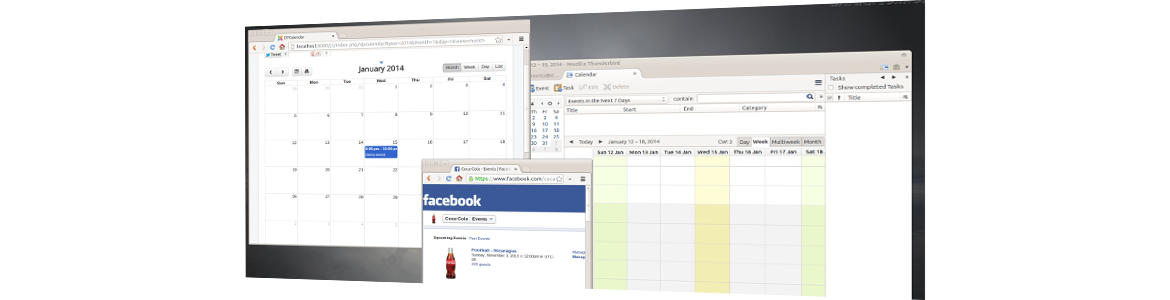 With our brand new DPCalendar version 3.3 we welcome your site visitors and let them to attend on your events. Reminders will be sent out to them when an event will happen that they will not miss the action. Beside that we introduced some more nice little adons which we will explain in more detail afterwards. But first we want to express some compatibility status about DPCalendar itself.
DPCalendar runs on Joomla 2.5 and 3.x and has the same look and feel on both versions. This means we use the same code on both branches. Joomla 2.5 contains no bootstrap library or the jQuery framework which DPCalendar contains as falback if they are not available. With that we can guarantee full responsiveness of DPCalendar and no version mismatch or missing features on Joomla 2.5.
Now lets dive into the new great features of DPCalendar the Joomla calendar of your choice.
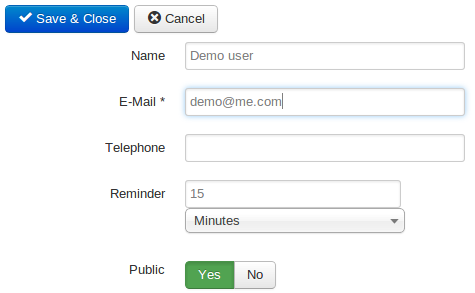 If the event has enough capacity the visitor can attend an event by providing his name and email address. Additionally he can define the time before the event starts when he want's to be notified per mail as reminder. You as user have to run a cron job every minute to check if reminders need to be sent out. If the event is a series event the visitor can specify if he/she wants to attend the whole series or only single events. The creator of the event has the option to directly attend the event on the edit form when a event is modified or created.
In the permission tab of the calendar the event belongs to the site administrator can define the rules which user groups can attend events. This means you have the possibility to let only a few chosen people to attend events.
Nowadays it became state of the art to have a Facebook page if you have a product, are a business or brand or an organisation. Facebook allows to create events on your fan page. But you want to let your web site visitors know about this events. DPCalendar allows not to include events up to 10 pages without a breeeze. Just provide your page id, app id and the secret to get access to the events in the DPCalendar Facebook plugin and we do the rest. The events will be integrated in DPCalendar as your ordinary events.
Of course your personal events from your Facebook account can still be integrated by the old way.
A big demand from web site administrators is to manage the Joomla calendars from DPCalendar from their preferred Calendar applications like Outlook, Thunderbird or iCal from Apple, even right from their smartphone or tablet is needed. Till now it was only possible to manage the personal calendars. But now you can manage the global DPCalendar calendars through CalDAV. In your CalDAV application you cal login with your Joomla credentials and as calendar url you can use an url with the following schema:
http(s)://{{joomla-site-url}}/components/com_dpcalendar/caldav.php/calendars/{{username}}/dp-{{calid}}
We improved the performance fro Firefox and Internet Explorer rendering. Beside that we are offering some new configuration options for the main calendar menu link and mini module. And last but not least we fixed some little bugs to deliver you a rock solid stable Joomla calendar extension suite.
In our next release we will focus on more flexibility in external calendar integration. This means you will be able to add unlimited external calendars from your desired event system. We try to implement two way sync on as many systems as possible when allowed.
It will also be possible to buy tickets to events through a payment processor to automate the event registration.
 This post is a break from the usual Joomla!-based posts we usually put up here. As our primary extensions are based around Google Calendar, we thought it would be interesting to see how calendaring software came about – and how far they have come.
The earliest dedicated machines that kept track of people’s lives were electronic (or pocket) diaries and organisers. PCs and more powerful computers, of course, featured scheduling software which soon became full-fledged personal information managers (PIMs). Borland’s Sidekick, which dates way back to the 80s, for instance, was the PIM of choice for many businessmen. People even used UNIX (and UNIX-like) OSes’ cron event scheduler as a rough-and-ready PIM (provided you know what you’re doing, cron makes an awesome personal scheduler).
As software became more sophisticated, PIMs became part of larger OS and office suites, such as iCal (now Apple Calendar) for OS X fans and MS Exchange and Outlook for Windows users. While these are Internet-enabled desktop software, there are also Web-only event scheduling systems, including Google Calendar, Hotmail and ownCloud. Of course, these calendars form only part of an overall range of services.
Today, of course, event scheduling systems have reached a new level of sophistication with the widespread adoption of mobile devices such as smartphones, phablets and tablets. Thanks to mobile broadband and WiFi hotspots pervading everywhere throughout most cities, “Internet everywhere” is no longer just a daydream, and this has led to a level of interactivity and intimacy between man and machine that would have been absurd to consider merely 2 decades ago.
No longer do you have to remember important dates – if your contact has filled out his profile correctly on Facebook (or any other social media site you both share), chances are your mobile device (or even your email) will remind you when his birthday rolls around. Men can buy St. Valentine’s Day and anniversary gifts for their wives well in advance, also thanks to their trusty calendars. Did you make an impromptu business engagement with someone you bumped into by accident after work? Just record it in your phone, and let it sync to your office PC the next day.
There have, of course, been people who bemoan the encroaching of mobile devices into our most private spaces. You should remember these important dates yourself, and not rely on electronic crutches, so their argument goes. But the rich and powerful have always left the remembering to others – in the form of secretaries, PAs and managers – and the only difference is now, the facility is available to the masses as well – and how!
With all of these different PIMs to choose from, it’s not surprising for many people to use multiple calendars. A person may well be running Outlook in the workplace (connected to his office’s Exchange server), iCal on his personal MacBook Pro, while using Cozi as his family calendar and connected to Google Calendar on his Android smartphone. He may also have to deal with Facebook’s event system (which is not necessarily tied to any calendar). Tying all these disparate calendars and event systems together can be a complex undertaking.
Fortunately, most modern calendars and PIMs use the Internet to provide them most of their usefulness and power – and use a standardised method to sync (usually CalDAV or iCalendar). While they generally have the same sort of feature set, it’s still worth taking a look and seeing whether your event scheduling platform(s) of choice offer these functions or not:
Cross-platform compatibility
Import/Export facilities
Auto-Sync
Integration with other software/services
Note-taking & file attachments
Calendar sharing & security
 The latest release of Twitter’s Bootstrap framework (some 2 months back) has both great as well as troubling implications for web designers who are currently using Bootstrap 2 (including those who have switched over to Joomla! 3). While there is no need to switch over immediately, its new features and a new paradigm means that this will be an attractive option for many.
Not everyone will jump on the bandwagon, of course. Joomla’s core development team, for instance, has intimated that they will not be incorporating Bootstrap 3 until the next major version of Joomla (v4, in this case). This means that Bootstrap 2 will continue to be the primary framework used in Joomla’s core and its extensions until a year from now. But if you want to be on the bleeding edge, then do take these things into consideration:
A significant (and very extensive) remodeling of the framework means that Bootstrap 3 is optimised and designed in view of mobile devices that may have minimal screen size and a portrait orientation by default. Bootstrap 3, in fact, has RWD in mind all throughout (but its developers understand that not every website should be responsive, and they do allow you to turn it off), and has changed its grid system to suit. In effect, this means that they expect Web developers to design their sites on phone screen resolutions, then make sure they work well when moving to higher resolutions. If you have been designing for desktop resolutions, and then testing for mobile devices, this is a change of paradigm you will have to get used to.
Simply dropping the new version of Bootstrap into your existing website could cause you a world of hurt. Almost everything has been redesigned and – more importantly – renamed. While there are ways of auto-updating your website from Bootstrap 2 to 3, it is a non-trivial task, and you would be best off checking manually that everything went smoothly.
Unlike proprietary software which has incredible support lifecycles (Microsoft, for instance, has supported Windows XP for a staggering 12 years), FOSS does not (and cannot) sustain such a business model, and is likely to have support lifecycles measured in months. In light of this, Twitter’s decision to drop support & continued development for Bootstrap 2 is understandable. The documentation is still on their website, and obviously expertise in Bootstrap 2 is not going away soon. Official support is not critical for something rarely subject to security vulnerabilities – but it is something to keep in mind.
For most people, this is probably not an issue. But if you do have a substantial number of users still using IE7 and/or Firefox 3.x, either stick with Bootstrap 2, or ask them to upgrade. Globally, the total number of people still surfing with both browsers combined is less than 2%, which is probably why Twitter decided they could drop support.
Progress is inevitable, and by 2015, assuming Twitter hasn’t come up with Bootstrap 4 or 5, we should see widespread adoption of this very popular framework. If you are building a website based on Bootstrap 3 right now, you should take full advantage of its greater ease and versatility. Otherwise, you may want to hold off for a year or so.