 More so than any other language, English can lay claim to being truly international. More people speak Mandarin, but most of them are ethnic Chinese concentrated in mainland China and Taiwan. The created language Esperanto is supposed to be international, but it is spoken only by a few million, as opposed to more than a billion English speakers. It is an official language in approximately 1/3 of the world’s nations, as well as that of the European Union. It is the only language used by international air traffic control (a regulation by ICAO). And English words form the basis for most of the more common and popular programming languages. We at Digital Peak are not Englishmen, but we speak, read and write in English (albeit not perfectly all the time).
This being the case, it is not surprising that the early Internet and World Wide Web started out as being predominantly English-based as well. As English is also the international language of the sciences and other academic studies, and as the Internet started becoming popular amongst universities, one can see why this is the case. Today, much of the Internet and the Web remains heavily biased towards English. For instance, Digital Peak’s CMS of choice, Joomla!, supports multiple languages, but the official website is solely in English.
However, that is changing, and has been changing over the past decade. An internationalized software package has access to a greater marketplace, and provides its users with more seamless experiences and wider options. Many factors have come together to drive the internationalization and localisation of software in all the various human languages; the seamless support for Unicode amongst the primary OS players and font developers, the rapid improvement of machine translation, and most of all, crowdsourcing. Joomla itself relies heavily on crowdsourcing for its non-English language support.
Traditionally, translating anything, much less something as complex as software, has been a difficult, expensive and time-consuming process. In addition to the high costs and cultural, sometimes political ramifications that may impact normal translation, software poses its own unique problems as well, since many US-centric third-party developers often assume English language strings and operate on such assumptions. Raymond Chen has highlighted some delightful anecdotes about how the Windows team comes across such issues in his book, The Old New Thing (also the name of his blog).
Today, though, through the power of crowdsourcing, translation of software into different languages no longer has to be expensive or time-consuming (although it may still be a bit challenging). We at Digital Peak use a cloud solution called Transifex. Free for open source projects (they also have paid plans for seriously large projects), Transifex offers an impressive array of features and facilities in order to ensure that translations of all the language strings in our projects are timely, and as we update our Joomla extensions, we can have all the documentation associated with them translated in near real-time.
You, too, can be a part of the Digital Peak translation team on Transifex! Just sign up and apply to be a contributor. We can be found here on Transifex, so come on by and help out. You’ll have the satisfaction of knowing that you helped to make our great extensions even more awesome. The full documentation how to help translate can be found here. We always update the translation files before we ship a new release. Means, you contribution will be shipped very quickly.

I'm sitting in my living room and think about how should I write an article that the loved GCalendar extensions has evolved and will be now DPCalendar Free? Should I write what has changed or why did we do that or where do we want go? I guess I start with some background information about GCalendar and DPCalendar.
I published GCalendar in the JED in 2007, over seven years ago, as a free (in beer and in use) extension. It was the only full featured Google calendar extension for Joomla at that time and continues to be the best Google calendar extension. The first version of GCalendar was created for Joomla v1.0.x series. Over the years many people have contributed to GCalendar. And the forum has grown with almost 25'000 posts. GCalendar has been downloaded over 2 million times at g4j.digital-peak.com.
The demand of the community increased and there were requests for many features that Google's calendar could not support. This meant we should keep the same slick interface but we needed to add the events to the Joomla database, instead of Google's.
We decided to make a commercial calendar version to deliver a professional Joomla calendar and event manager extension. DPCalendar was born! DPCalendar has grown very fast and supports now CalDAV access to its calendars, payment gateways to attend events and tons of external calendar integration plugins like CalDAV/iCloud/ownCloud, Google calendar, Facebook pages, MS Exchange or iCal events (Yahoo, Outlook.com, and many other calendars). To name just a few features.
During this time, GCalendar was at a very stable state and not many changes were needed. We published the GCalendar Action Pack to edit the Google events directly from within Joomla. Minor tweaks and updates have slowed. The options to grow and add new features for GCalendar are very limited due to the Google calendar limitations.
Maintaining three products, GCalendar, Action Pack, and DPCalendar, which do basically the same thing was inefficient. Paul and I were discussing back and forth what should we do. I wanted to reduce the development time to be able to put energy into only one calendar extension. At the same time to provide a healthy free event extension for the masses and a commercial one for professionals with proper support. We decided there must be only one product and it will be DPCalendar. But how should the free version look like?
First we thought that we should slim down DPCalendar and provide it with the Google calendar plugin. But that would be more confusing to the people. They would basically have an empty component and a very powerful Google calendar plugin. A next idea was to make DPCalendar free without the external plugins. But what would be the migration path for the GCalendar users? We didn't want to force them to buy the DPCalendar professional version just to be able to use their existing Google calendars. So we decided at the end to make a slimmed down version of DPCalendar with a GCalendar integration plugin. This means that the free version of DPCalendar has a reduced feature set (no CalDAV support, no attending feature, etc.) and the existing GCalendar users can integrate or import their GCalendars. New DPCalendar Free users will have then events stored into the database and benefit from the much richer feature set than GCalendar had.
The table below shows the different versions and feature sets:
| Feature | Free | Standard |
Professional | Premium |
| Component (The free version does not contain features like CalDAV access, recurring events or the list/map view and some more.) | ||||
| Upcoming Module | ||||
| Counter Module | ||||
| Mini Module | ||||
| Map Module | ||||
| Search Plugin |
||||
| Finder Plugin |
||||
| Ical Plugin | ||||
| Jomsocial Plugin | ||||
| CSV Plugin | ||||
| JEvents Plugin | ||||
| JCalPro Plugin | ||||
| Google Calendar Plugin | ||||
| Facebook Event Plugin | ||||
| CalDAV Plugin | ||||
| MS Exchange Plugin | ||||
| Manual Payment Plugin | ||||
| PayPal Payment Plugin |
The DPCalendar Google plugin uses the newest Google Calendar API v3 with OAuth2 authentication (it is not required anymore to store your google credentials in DPCalendar). This API is much faster because it uses JSON as transport protocol. More features which are available only in this API v3 are event colors. Events can created/updated/deleted directly from your Joomla web site.
The API v3 doesn't rely on Zend anymore which makes the footprint much smaller and the Zend_Loader errors are history.
We migrate all GCalendar Action Pack subscriptions in the next couple of days from g4j.digital-peak.com to joomla.digital.com. The subscription will be turned into a DPCalendar professional subscription with the length the Action Pack had. All subscriptions which are expired or less than two months valid will be activated and end two months after migration that you will have enough time to do the move. We will not leave you out in the rain.
Google is shutting down their API version 1 which is used in GCalendar on 17. November 2014. You can read the announcement here. GCalendar will not work anymore after that, but the DPCalendar - GCalendar plugin will. You will find all information here how to do the migration from GCalendar to DPCalendar (Free).
We always want to provide a free extension for the Joomla community because we get back so much from the community. This means there will be always a FREE DPCalendar version. To the subscribers we offer top notch support, a cutting edge DPCalendar version and tons of plugins like Facebook integration or PayPal payments. I really hope that you are taking the next steps with us and that the new strategy will be a success story for all of us, the team of Digital Peak and the Joomla community.
Sincerely the founder of Digital Peak
Allon Moritz (aka laoneo)
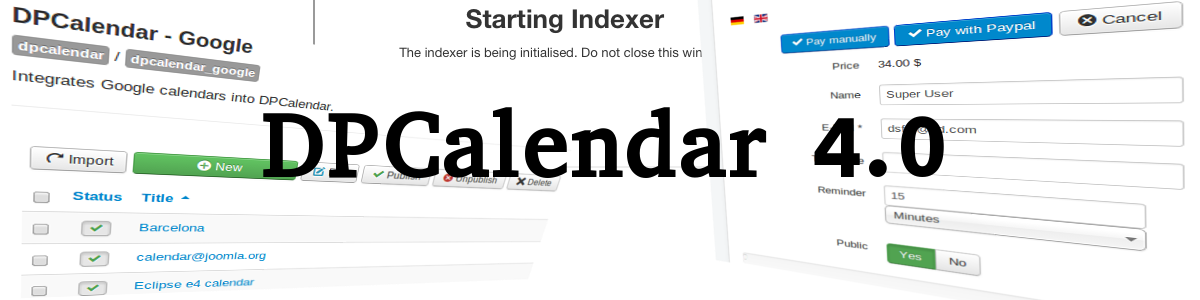
We've been working hard in the last couple of weeks to deliver the most feature rich DPCalendar version to our friends and community. The DPCalendar 4.0 release is a new milestone in the area of Digital Peak as we provide now an all in one event experience. The users can navigate through your events on the ajax based intuitive interface or based on locations. Let them attend the events and if needed let them pay for it through our new payment plugins "Manual payment" or "PayPal payment" (more payment plugins will come soon). Send out notifications to get them back to your site. Or do you need to import unlimited Google calendars. We have it now! Read on for a more detailed list of killer features in this release.
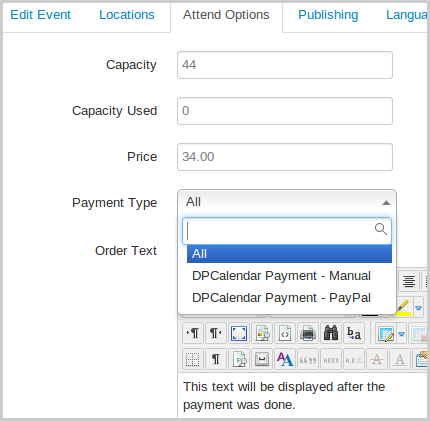
A long demandig feature request was to support some payment processors for attendancees to extend DPCalendar to a reservation system. You can now define in the attending options of DPCalendar a price the attendee has to pay for and a payment type with which she/he has to do the payment. On the attending form the visitor can to choose then from one of this options to make the payment.
It sounds like a simple addon but in the background we had to make big changes as it was needed to completely revamp the old workflow. We are proud now to deliver such a feature to you. In the future we will implement more payment gateways like 2checkout, authorize.net or more. We will see what er the biggest needs from our customers.
Since the beginning, DPCalendar was designed to support external calendar sources like Facebook pages, CalDAV servers, MS Exchange, Google calendar or more in a seamless way that the visitor will get insights into ALL your events on your Joomla site in one place. We had a limit of 10 calendars per external calendar plugin which was enough for most of our customers but not all. Because of that we implemented in the plugin options a completely new external calendar system which enables the site admin to add as many external calendars as needed.
For the most popular plugins like Google calendar, Facebook pages or CalDAV servers (iCloud, ownCloud, etc.) we made some importers for a hassle free quick setup.
We packed the verison 4 with tons of new nice little features. We have now an Xmap plugin to add your events easily to your sitemap. A new finder plugin integrates the DPCalendar events into smart search and events from Google can be edited directly in DPCalendar. The changes will be written back to Google immediately. To prevent spam events you can force certain user groups to add a captcha code when editing an event in the front.
Some legacy features like jQuery UI themes are removed in this version and we come now with single installer files for every kind of subscription. If you add the download ID we even support the Joomla core updates. Means you don't have to go extra to the DPCalendar control panel and do the update manually. You will get notified through the Joomla updated manager where the updates can be don through it.
Since I put my shoes into the IT world I'm an advocate of Open Source, that's the reason why I started to use Joomla. In my first years of Joomla extension development I gave away my extensions for free with the same passion or even more as I would get payed for it. So became GCalendar one of the most popular Joomla extension. The demand of the community increased and I decided to make a commercial version of GCalendar. DPCalendar was born! DPCalendar grow and became mature with a much more advanced feature set than it was ever possible with GCalendar. At the same time I wanted to give the Joomla community something back, that's the reason why we are offering a FREE version of DPCalendar which as basically the next step in the evolution of GCalendar. If you are a GCalendar user please read the migration guide how to do the transition from GCalendar to DPCalendar.
Sincerly
Allon Moritz (aka laoneo) founder of Digital Peak

By now security and Web experts all over the world have gone berserk over a new – and exceedingly terrifying – vulnerability in the latest versions of OpenSSL called Heartbleed. Since the Joomla! CMS is in use by some of the world’s largest companies for their websites, and since OpenSSL is in use by many, many LAMP architectures (not only by Linux, but also by Apache), and since LAMP is the platform Joomla mostly runs on, we thought we’d give you a quick rundown on what the Heartbleed vulnerability means, whether you are affected by it, and what you can do to fix it.
Firstly, though, let’s give the good news first. If you are in total control over your Joomla website (especially the LAMP part), then you can easily fix Heartbleed on your website (and we’ll tell you how later on). If you are using WIMP or some other SSL implementation library (such as Microsoft’s SChannel or GnuTLS), then rejoice! for the Heartbleed vulnerability does not affect your website in the least. If you are using an older version of OpenSSL (i.e. 1.0.0 or lower), there is no corresponding vulnerability. And of course, if your website does not use SSL/TLS, then this is not an issue for it either.
Now, the bad news. OpenSSL is one of the most popular Free and Open Source (FOSS) SSL/TLS implementation libraries on the world, and Heartbleed affects all OpenSSL 1.0.1 releases until 1.0.1g (which was when it was patched and released on 7th April 2014). Since 1.0.1 came out in 2012, this means that this vulnerability has been around for about 2 years. So, even if your Joomla-powered website is not affected, you probably are. A worst-case scenario shows that about 66% (or 2/3) of the Web could be affected; a more realistic estimate is about 17%-18%, which is still significant (especially if it’s the right – or in this case wrong – 17%-18%).
So what is the Heartbleed (CVE-2014-0160) bug? In essence, it is an implementation bug (not inherent in the actual protocol) involving TLS (more specifically, the TLS heartbeat extension as specified in RFC6520). Some developer of OpenSSL back in 2012 missed a bounds check, which led to an attacker being able to read up to 64kb of process memory on either the implementing server, or a connected client (albeit to an ‘evil’ server).
The problem is that 64KB of RAM is the limit for a single Heartbleed attack. Attackers can spawn any number of attacks, thus reading any arbitrary amount of RAM they want to read that has been allocated to the process. And on a webserver, that includes the most critical component of SSL, the server’s secret/private key used to generate the SSL certificates. That key has to be in RAM, because that’s what is used to decrypt the SSL/TLS-encrypted data. While it can also uncover other bits of data (e.g. usernames, passwords, financial information), that’s not as critical as the fact that it can effortlessly conduct man-in-the-middle attacks and even impersonate the webserver. Imagine the ramifications for major banks and cloud storage providers, for instance.
So, if your website is affected, what can you do about it? For your Joomla-powered website, check and make sure that all of the OpenSSL libraries you’re using (OS and Web server, but possibly also your Joomla extensions) have been updated to the latest version (1.0.1g) or have been patched (many Linux distributions are patching 1.0.1f, and others are backporting the patch all the way back to 1.0.1). After patching or installing the latest version, restart your server (probably best to do a cold boot if you can). If your website is a hosted one, your options are more limited; you will have to bug your webhost to upgrade their systems – but most responsible webhosts should be doing so within the week anyway.
You then need to revoke your existing certificates and create new private keys and fresh certificates (see if your certificate vendor will give you a discount or even make it free). Use a checker like https://lastpass.com/heartbleed/ or https://www.ssllabs.com/ssltest/index.html to verify that your server’s security is no longer compromised. And most importantly, tell your users that you have already fixed the Heartbleed problem, so they should reset their passwords immediately.
This is quite possibly the worst-case scenario for Internet security since the inception of Internet security. It definitely blows the Snowden disclosures out of the water in terms of its impact – it’s a truly global issue and affects everybody.
 With the impending release of Joomla 3.3, the Joomla Core development team has taken the decision of increasing its minimum PHP requirements to version 5.3.10 due to security reasons – as the team explains, it was due to “a significant change made in the PHP 5.3.x series leading up to PHP version 5.3.10 that substantially enhances the level of cryptography that can be used for securing passwords.” Given the number of revelations concerning the “Big Brother”-like global electronic surveillance systems run by various national intelligence services, this is definitely a step in the right direction. But much remains to be done, and now is the time to get ready for the (post-Snowden) brave new World Wide Web.
The past 2 years have been horrid, in terms of security news. Various user information databases have been hacked and cracked, some of which belong to giant names including LinkedIn, Yahoo! and the latest one, Adobe. Dropbox, one of the most popular cloud storage services, has been cracked numerous times. And of course, the granddaddy of all security news, the Big Bad NSA. While it is unlikely that most of us really have sensitive data in need of being secured from the government (nobody here’s using Joomla to serve up a bomb-making forum, right?), there are still valid reasons to ensure our websites are secure (EU regulations being just a part of it). So here are some things to consider when upgrading to Joomla 3.3 – not very difficult to do, but it may require you to spend some money on security.
More and more, websites are beginning to use encrypted connections not only during user authentication, but for every individual user session. With open wireless hotspots becoming very popular, not only the major email players such as Google, Yahoo!, and Hotmail are doing this, but most social media and cloud storage providers have started as well. Firefox has an extension called HTTPS Everywhere, which attempts to enforce the use of encrypted connections wherever sites support them. If your Joomla website stores user details (including passwords and financial information), then you need to consider enabling HTTP Strict Transport Security, which means getting an SSL certificate (or even an Extended Validation certificate). We at Digital Peak take security very serious and have enabled HTTPS for every logged in user or purchase.
Stronger cryptography or not, storing passwords directly is a recipe for disaster. Your Joomla website, if it requires user authentication, needs to be storing and comparing password hashes, optionally (and preferably) individually and randomly salted. You can also help your users choose strong passwords by enforcing certain password requirements (minimum length, require alphanumeric + special characters, password expiry etc.) which can be automated by the use of Joomla password extensions.
Many financial institutions and other companies who provide high-value services have dispensed with the simple username/password combination, requiring in addition a one-time code/token as well. This token is usually generated on-the-fly by a hardware device (or software equivalent installed on a mobile device); alternatively, it may be sent via SMS. In either case, it required both something you know (password) and something you have (your mobile phone or hardware device) to log in; hence the name 2-factor. Joomla 3.3 natively supports the use of the software-only Google Authenticator as well as Yubico’s YubiKey (this feature was added in version 3.2), and several extensions add the ability to earlier versions of Joomla. You may also consider using services such as Duo Security to do the same thing.
We have enabled two factor authentication on our site as well, means you can enable your preferred method in your account settings. On our login page you can see the secret key to input. No need to wait to make your account even more secure at joomla.digital-peak.com!
